API Testing 101
Everything you need to know to start testing APIs with confidence.
An API (Application Programming Interface) is a set of rules and protocols that allows different software applications to communicate with each other. Think of it as a waiter in a restaurant — you (the client) tell the waiter (the API) what you want, and it goes to the kitchen (the server) to retrieve it.
APIs define the methods and data formats that applications can use to request and exchange information. They abstract away complexity, exposing only what's necessary for external consumers.
Most APIs use the REST architecture, so for the purpose of this tutorial we will focus on REST. REST defines 6 constraints, and they are:
HTTP status codes are three-digit numbers returned by a server to indicate the result of a client's request. They're grouped into five classes:
The most common ones you'll encounter are 200 OK, 201 Created, 400 Bad Request, 401 Unauthorized, 404 Not Found, and 500 Internal Server Error.
REST (Representational State Transfer) is an architectural style for designing networked applications. RESTful APIs use standard HTTP methods to perform operations on resources, which are identified by URLs.
REST APIs are stateless — every request must contain all the information needed to process it. The server does not store session state between requests.
GET https://api.example.com/users/12Returns the user with ID 12 as a JSON object.
Every API call starts with a URL. Hover over each coloured segment below to understand exactly what each part does.
// Interactive Reference
Anatomy of an API Request
Hover over any highlighted segment of the URL below to learn what each part does.
Mnemonics are a great way to remember testing checklists under pressure. Here are four widely used ones in API testing.
They are heuristics or rules of thumb to help guide your testing and help focus on areas that are risky and important. They can be used to create tests, ask questions to stakeholders, and come up with a testing strategy that isn't completely random or unguided.
I have covered the BINMEN heuristic in more detail here
Whether you developed the API or have been asked to test it, fundamentally you should want to know as much information about it as possible.
The definition of testing I use comes from Michael Bolton:
“Testing is an evaluation of a product through experimentation, experience and exploration”Michael Bolton
So by exploring, I am referring to testing, and vice versa.
Testing is exploratory, because testers have agency and can change direction, tactics, look at different things based on their intuition, skills, heuristics. When testing, we should be looking for problems and not focusing on successful outcomes.
Exploring an API could also be described as "simultaneous test design, test execution and learning". You are building a model in real-time by experimenting with the API and then taking your learnings as information to guide you through. You may have documentation or requirements that you've been given. They are claims made about the software and only through testing those claims can you compare their claims with reality. You may have no requirements to test against and in this case you build your model based on exploration and then report what happened during your experiments.
I’d recommend using session based test management (SBTM) to document your testing. A session is a focused time box with a mission to find some information about the system you want to test.
This is what a charter looks like.
Charter:
  Mission: Try and see user data using invalid API tokens
  Tester: David Jones
Notes:
  API uses basic auth (why not something more secure?)
  Error message when not passing in key is confusing
  When using an expired token, I got a different error code


Issues:
Wrong status code on expired token
Bugs:
- What is the purpose of the API and how does it achieve that purpose or solve a problem?
- What documentation is available?
- What boundaries does the developer think exist? Does the PO agree?
- What are the requirements and who do they affect?
- What authentication does the API use?
- What happens if I don't pass in a valid token? expired token? invalid token?
- What harm can be caused by using this API improperly? bad auth? data leakage? slow performance?
A test oracle is a "means by which you attempt to recognise a bug during testing" (from "Taking testing seriously" by Bach, Bolton)
Here are some examples of oracles you can look for.
TATTA and TUTTU are a pair of heuristics from Mark Winteringham (author of Testing Web APIs) that help you decide which layer a check actually belongs at. The guiding idea is that the risk decides the level — not the tool you happen to reach for.
TUTTU asks: am I Testing the UI or Testing Through the UI? If the risk lives in the interface itself — how a component renders, layout, a style guide — then you are testing the UI and you genuinely need to drive the check through the UI. If the risk is really about something behind it, such as storing data correctly, then you are only testing through the UI and don't need it at all — you can drive that check at a cheaper, more stable layer like an HTTP or library API.
TATTA applies the exact same question one level down: am I Testing the API or Testing Through the API? When the risk is in the API itself — its status codes, contract, validation or error handling — test the API directly. When the API is just the route to a deeper risk, such as a business calculation, you're testing through it, and that logic is often better covered by a unit test.
Some examples of where a check belongs:
| Testing the API | Testing through the API | Testing the UI | Testing through the UI |
|---|---|---|---|
| A request for a missing resource returns a 404 | POST an order and confirm the total includes the right discount | JavaScript field validation rejects a malformed email | Submitting a form and checking the data is saved in the database |
| An invalid payload returns a 400 with a clear error | Create a user via the API and confirm a welcome record is generated | A disabled submit button renders per the style guide | Logging in through the form and confirming a session is created |
The names come from Winteringham's talk "Say TATTA to your TUTTU". More on his approach in Testing Web APIs.
Test coverage can mean many things. You may have heard of metrics such as branch coverage, line coverage, etc. Even if these types of coverage claim 100% of something, there could still be issues in the code. When testing an API you should be concerned with what you haven't yet tested as well as what you have tested. Therefore, I think it's better to use a heuristic framework rather than deadset coverage rules to think about while you're testing.
To understand an API you should create a product coverage outline of all testable elements of an API
You can use a mindmap or even a list, but the idea is to not take too much time developing this and to do it yourself. This outline feeds into your model and understanding of the product that will inform further, deeper exploration into its features if required
more in-depth info on PCOs can be found here
- Function coverage — have you exercised the features and capabilities?
- Data coverage — have you tested the relevant values, boundaries, combinations?
- Platform coverage — environments, OS versions, hardware, browsers?
- Operations coverage — how users actually interact with the system?
- Code coverage — lines/branches executed (acknowledged, but not privileged over other types)
- Risk coverage — have you addressed the most important risks?
Depending on your chosen API client, will determine the syntax you will need to learn
If you use Bruno or Postman, you will need to be familiar with some basic JavaScript and chai assertions
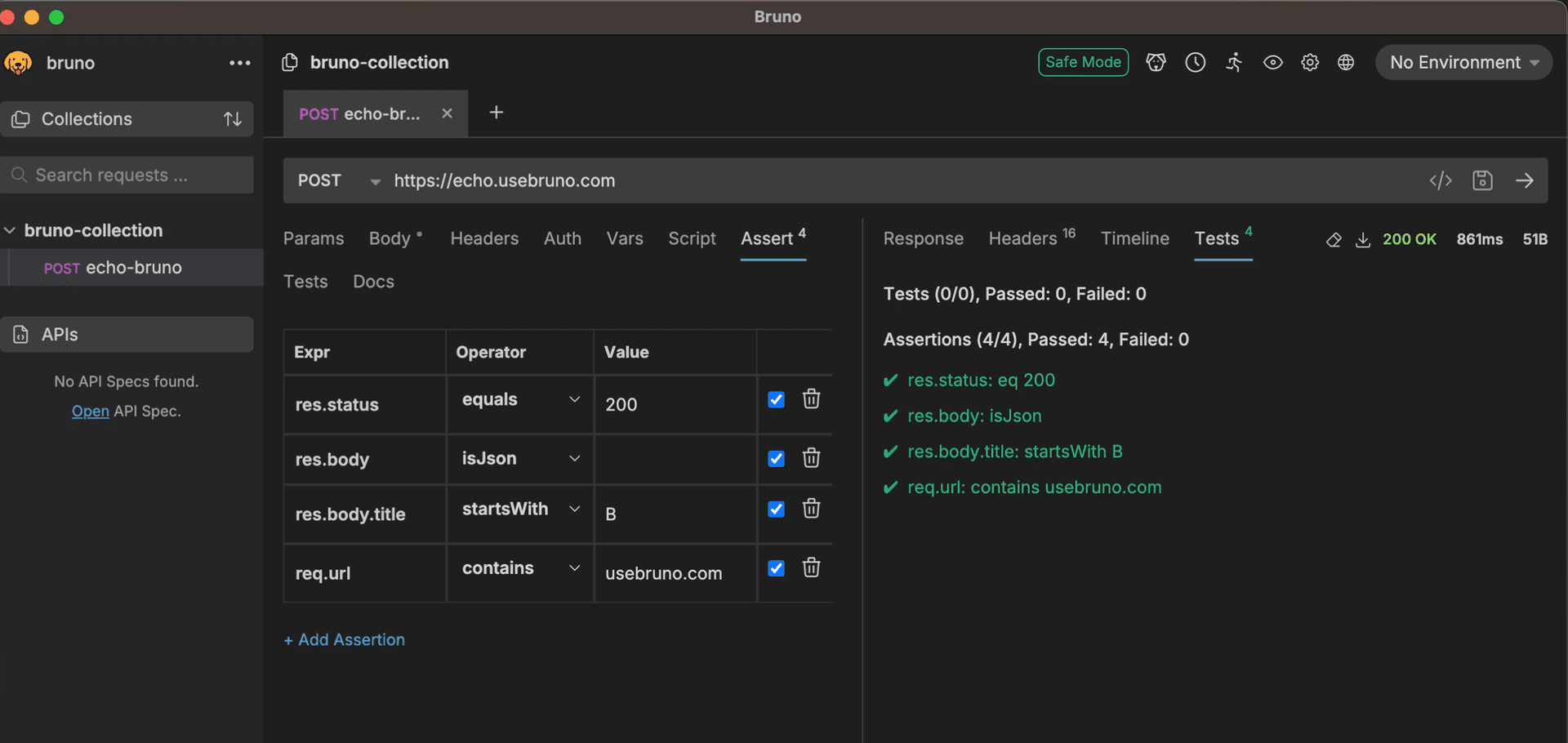
Assertions
Assertions allow you to declaratively write tests without writing any code.
Scripts
Scripts are any code that runs before or after a request that is not a test. Scripts can be used to populate test data or achieve many other things that aren't tests.
Scripts are categorized as either pre-request or post-request depending on when they run relative to the request being sent
/**
 * This function prints a string to the Postman Console.
 * @param {string} data - The text to print to the Postman Console.
 */
function logger (data) {
    console.log("Logging information to the console")
}
Tests
Tests on clients like Bruno or Postman are usually written in a modified version of JavaScript with a syntax made for each client.
They are written in a BDD chain language known as Chai BDD
pm.test("Status is 200", function () {
  pm.response.to.have.status(200);
});
These tests are separate from Unit tests, integration tests or contract tests that will usually be written by the developer and in the same language and framework that the API was developed in.
Developing an API is obviously different to testing it, so I've not covered those tests in this tutorial
Documenting tests
In a lot of projects, documentation about APIs is often limited or non-existent. When I have tested an API I often add documents to the API collection itself whether in Postman or Bruno.
This makes it easier for the next person to look at the collection and gather information they can use for their mental model or use as a kind of oracle.
What automated checks cannot do
Automated checks are mechanistic and cannot look for new problems. That doesn't mean they cannot be used to augment exploration, but by themselves they cannot find new problems.
CLI test runners
Once you have a collection with tests that you want to run consecutively, you can use a CLI runner to run those tests on demand